Guide
Monitor Arm vs Monitor Riser: Which Fix Is Worth It for a Small Desk?
As an Amazon Associate I earn from qualifying purchases. Prices and availability change — verify live CAD price, specs, and shipping on Amazon.ca before buying.
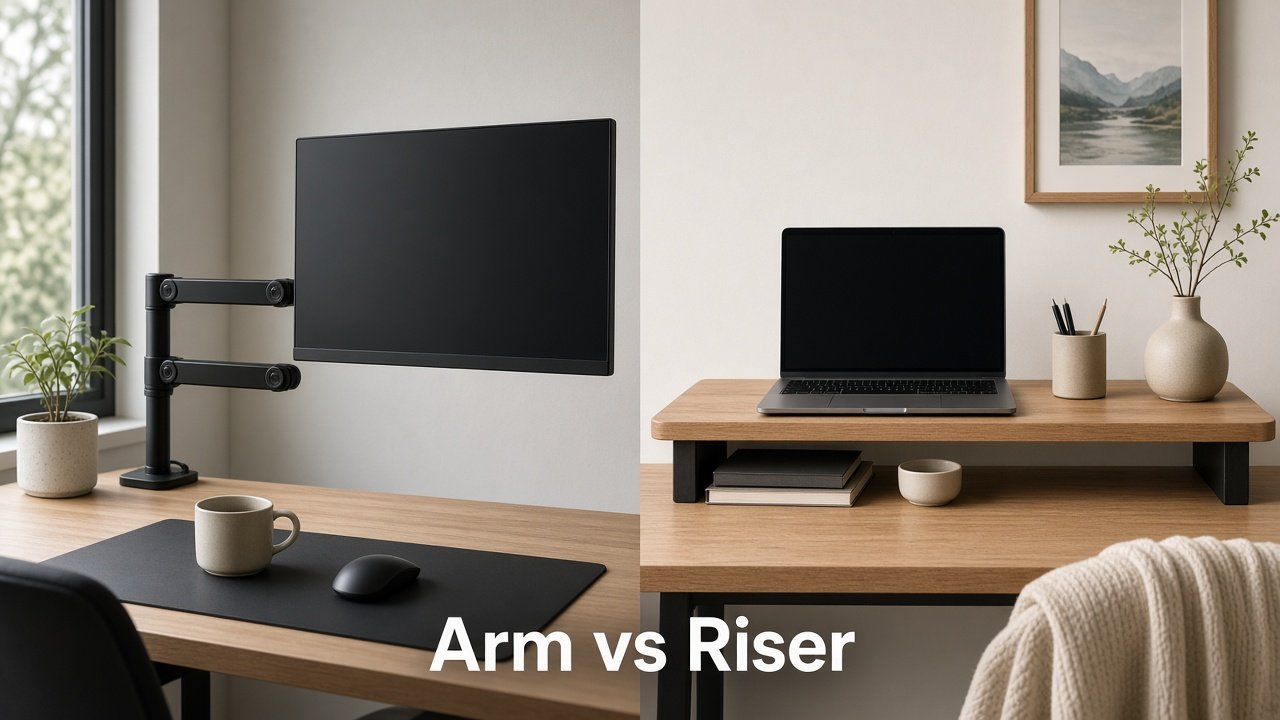
If your desk already juggles a laptop, notebook, coffee, and a monitor, the problem usually isn’t the screen—it’s the footprint.
The stock stand eats depth. Cables spill forward. On a 40–48" apartment desk (or a kitchen table that becomes an office at 8:30 a.m.), that lost surface feels bigger than the monitor itself.
Two Amazon.ca fixes show up in every search:
- A clamp-on monitor arm (often gas-spring)
- A monitor riser / stand with storage underneath
Both can raise the screen and calm the mess. They’re not the same buy. One reclaims desk space and lets you dial height and tilt. The other is simpler, kinder to awkward renter desks, and gives you a shelf for a keyboard or notebook when the day ends.
This is for Canadian remote workers shopping Amazon.ca in CAD who want a practical call—not a medical lecture. Soft note only: getting the screen closer to a natural viewing height and clearing clutter often makes long days feel less tiring. Bodies and desks differ; adjust slowly and choose what feels right.
Quick decision checklist
| Question | Lean arm if… | Lean riser if… |
|---|---|---|
| Desk thickness / edge | Solid top ~0.4–2" (≈1–5 cm) with a clear clamp edge (or grommet hole) | Thin particle board, lip, glass, no clamp access—or you won’t clamp |
| VESA | 75×75 or 100×100 mm holes on the back | No VESA, or you don’t want to remove the stock stand |
| Weight | Monitor sits under the arm’s rated capacity with margin | You want a wide shelf and “set it and forget it” load tolerance |
| Ultrawide? | Yes—buy a heavy-duty / ultrawide-rated arm | Maybe—a wide wood/metal riser works for many 34" setups if depth fits |
| Need surface space? | Yes—keyboard + notebook + coffee must share a small top | You mainly need height + under-shelf storage and can spare the riser footprint |
Renter tip: Clamp arms usually need no drilling—but measure so the clamp doesn’t hit a drawer, crossbar, or soft particle-board edge. Flimsy desk? A riser is often the calmer choice.
Monitor arm: pros and cons
Pros
- Reclaims the desk. Stock stand gone → depth back, especially on shallow condo tops.
- Adjustability. Raise, lower, tilt, often swivel/rotate without rebuilding the setup.
- Cable channels. Clips/channels keep cords off the work surface.
- Shared-desk flexibility. Pull close for deep work; push back when the table becomes dinner or homework space.
Cons
- Compatibility homework. VESA, weight, desk thickness, and clamp clearance all matter.
- Longer install. Remove stock stand, attach VESA plate, set spring tension, route cables.
- Desk quality matters. Sturdy laminate/wood is fine; hollow or ultra-thin tops may flex or show clamp marks.
- Cost climbs with size. Capable 24–32" arms are mid-range CAD; true ultrawide/heavy panels cost more.
Best for: One primary external monitor on a clamp-friendly desk where surface space is scarce.
Monitor riser: pros and cons
Pros
- Simple. Place (or quick assemble), put the monitor on top—no VESA required.
- Storage under the shelf. Keyboard tuck-away, notebook stack, small dock—easy “closed for the day” look.
- Renter-friendly on awkward desks. Glass, lips, drawers under the edge, or “please don’t clamp this” tops.
- Usually cheaper. Solid wood/metal risers with storage often beat a good gas-spring arm on CAD.
Cons
- Still occupies the desk. You gain height and under-shelf space; the footprint remains.
- Less fine-tuned height. Most are fixed (~4–6"). Great for a bump up; not arm-level precision.
- Doesn’t free the depth the stock stand used—it replaces that footprint with a different shape.
- Weaker cable story. You’ll still want clips or a tray.
Best for: Non-VESA monitors, thin/awkward desks, zero-clamp renters, or anyone who values under-shelf storage as much as height.
Who should buy which?
Buy an arm if you: have VESA 75/100; can clamp or grommet safely; want maximum clear surface; adjust posture or share the desk through the day; run a heavier/ultrawide panel and will buy a rated arm.
Buy a riser if you: won’t remove the stock stand; have a thin, lipped, glass, or no-clamp desk; want a shelf for keyboard/notebook; prefer a lower CAD spend and a 10-minute setup; are testing “higher screen = happier day” before committing to an arm.
Hybrid: Riser under a laptop + arm for the external, or riser now and arm later after a sale. Nothing has to be permanent on day one.
Product placeholders (Amazon.ca · CAD)
Measure before you buy (5-minute audit)
- Desk thickness at the clamp zone
- Clearance under the edge (drawers, crossbars)
- Monitor weight + VESA (75×75 or 100×100)
- Screen size / ultrawide? Filter for arms that explicitly support that class
- Desk depth—will a riser’s footprint crowd you, or will an arm’s cleared surface matter more?
- Cable reach after the screen moves up or out
Write the numbers in your phone before you open Amazon.ca.
Simple cart paths
Path A — “I need my desk back” (arm): gas-spring or budget clamp arm → cable clips → optional under-desk tray → optional desk mat. Rough cart feel often ~$60–$150 CAD depending on arm tier—verify live.
Path B — “Keep it simple / renter desk” (riser): wood/metal riser with storage → clips or short tray → optional desk mat. Rough cart feel often ~$40–$90 CAD—verify live.
Path C — Not sure: start with the riser if clamping looks risky; upgrade to an arm later once VESA and a sturdy edge are confirmed.
Soft comfort reminder
Raising a screen and clearing clutter helps many people feel more settled on long WFH days. This isn’t medical advice—just setup practicality. Change height slowly, take breaks, and pick what your desk can support safely.
Next up
Once the monitor is where you want it, the next visual win is usually the spaghetti under the desk.
Next post: 7 Cable Management Mistakes Remote Workers Make (And the Amazon.ca Fixes) — tray placement, adhesive fails, power-strip daisy chains, and the renter-safe order of operations.
Prices and availability change. Confirm specs, CAD price, and shipping on Amazon.ca before you buy. Affiliate links (when live) support this series at no extra cost to you.