Guide
7 Cable Management Mistakes Remote Workers Make (And the Amazon.ca Fixes)
As an Amazon Associate I earn from qualifying purchases. Prices and availability change — verify live CAD price, specs, and shipping on Amazon.ca before buying.
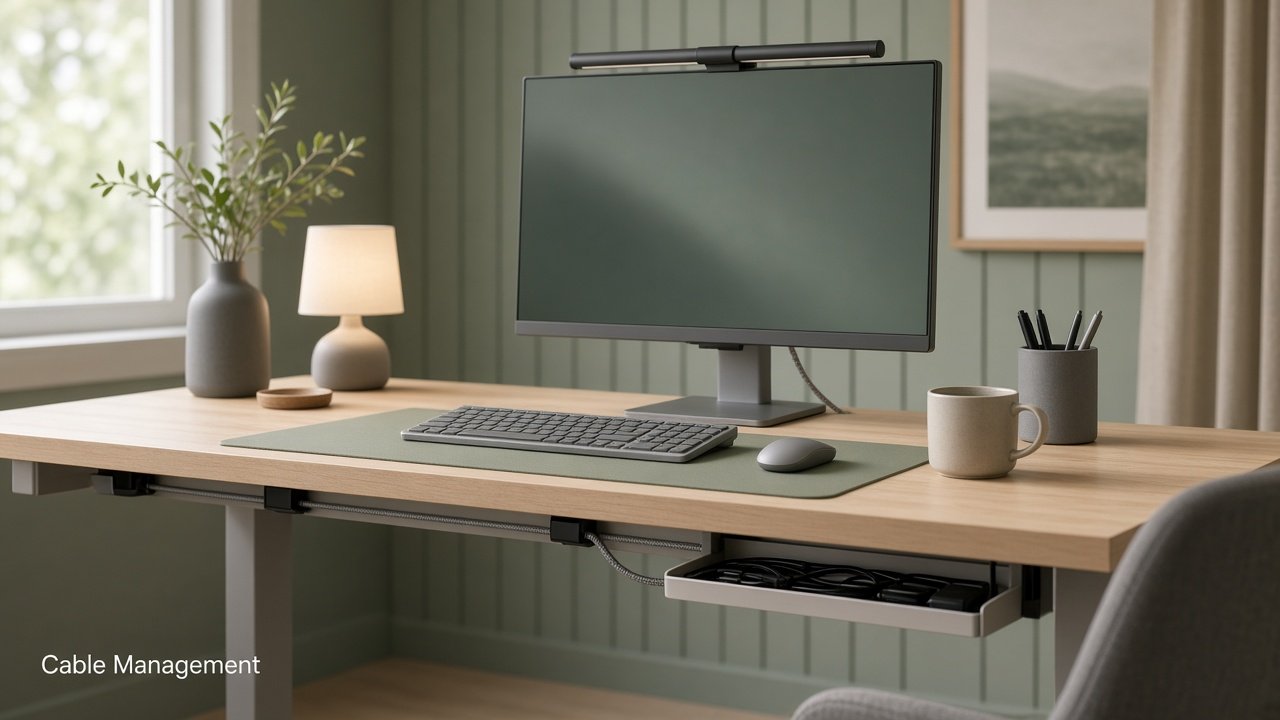
If your under-desk looks like a festival of bricks, dongles, and one lonely power strip on the carpet, you’re not alone—and you don’t need a new desk to fix it.
Canadian remote workers on 40–48" apartment desks (or a kitchen-table office) usually don’t have a cable problem because they bought “the wrong stuff.” They have one because the order of fixes was wrong: zip-ties before sorting, strip on the floor, no slack for the chair, adhesive that peels in a week.
This guide covers seven common mistakes, why each fails on a small renter desk, and the Amazon.ca fixes that stick—CAD, Prime-friendly, no drilling. Soft comfort only: a calmer cable path and a clearer surface often make long screen days feel less fussy. Bodies and desks differ; adjust slowly and choose what feels right.
Prices are approximate CAD bands typical of Amazon.ca around Sep 2026—verify live price, Prime eligibility, and reviews on publish day.
Mistake 1: Zip-ties first (permanent ties before you sort)
What goes wrong: Cinched zip-ties on day one—every cord “neat” before you know which brick is the monitor, which is the laptop charger, and which is the dead HDMI from 2022.
Why it fails: Permanent ties lock in a bad map. Swap a monitor or vacuum underneath and you’re cutting plastic—and on a small desk, that bundle hides the one cord you need at 4:55 p.m.
Sort first: unplug what you haven’t used in two weeks, then wrap loosely by device family. Prefer mixed lengths and soft wrap that won’t chew jackets.
Mistake 2: Power strip living on the floor
What goes wrong: One long strip on the carpet under the chair path—or daisy-chained strips “just for today.”
Why it fails: Floors collect dust, pet fur, and vacuum collisions; chairs roll onto plugs. One quality surge strip in the right place beats three bargain strips on the baseboard.
Renter tip: Sit the strip in or beside an under-desk tray—not on the walking path. Leave vacuum clearance. One strip, no daisy chain.
Mistake 3: No slack for sit-stand or a rolling chair
What goes wrong: Cords routed dead-straight from monitor to wall, with zero play for a converter, a chair that rolls back, or a Friday “pull the laptop closer” stretch.
Why it fails: Tight routes yank ports and unplug mid-call. Even without a full standing desk, many Canadian renters scoot or use a converter—and a taut HDMI hates both.
Route a gentle S-curve near hinge points (arm joint, converter rear, desk edge). Clips hold the path; they shouldn’t stretch the cord like a guitar string.
Mistake 4: No under-desk tray (bricks still on the floor)
What goes wrong: Clips on the edge, raceway on the leg… and heavy bricks still piled on the carpet.
Why it fails: Bricks are the visual and vacuum problem. Surface clips alone don’t finish it. On a shallow desk, floor bricks become foot and chair hazards.
Prefer clamp mounts on solid edges; adhesive/screw-free options if you won’t drill. Drop bricks in, feed cords up, clip the rest along a leg. Usually the highest before/after payoff after Velcro.
Mistake 5: Dongle and hub sprawl on the surface
What goes wrong: USB-C hub, HDMI adapter, SD reader, and short cables living on the mat—moving every time you open a notebook.
Why it fails: Surface sprawl eats the one thing a small desk doesn’t have: clear depth. It snags sleeves and photographs badly on camera days.
Collapse three adapters into one hub. Rest it at the rear, in the tray zone, or beside a riser—not in the keyboard/mouse rectangle. Park any hub brick in the tray, not on the floor.
Mistake 6: Bad adhesive that fails in a week
What goes wrong: Ultra-cheap sticky pads on textured laminate, dusty undersides, or cool September mornings—then everything drops by Tuesday.
Why it fails: Adhesive is a system: clean surface, enough press time, and clips rated for cable weight. Rushing dusty particle board is a classic Canadian apartment fail.
Wipe, press firmly, wait before loading heavy cords. Raceway for vertical leg/wall runs; clips for gentle redirects. Rough underside? Prefer a clamp tray for heavy bricks.
Mistake 7: No labels — “which brick is which?”
What goes wrong: Identical black bricks in the tray with no tags. Unplugging “the unused one” becomes chance before a client call.
Why it fails: Trays hide mess and identity. Without labels, dead cables stay forever and the tray fills again.
Tag the brick and the desk-end: Monitor, Laptop, Lamp, Hub. Two minutes now saves months of guessing.
Optional: large desk mat
Once under-desk is calm, a mat hides scuffs and makes the hub-free surface look intentional.
Approx. CAD: ~$15–$40 · large desk mat
30-minute fix order
- Unplug audit (5 min) — Bag what you haven’t used in two weeks; don’t Velcro yet.
- Label survivors (3 min) — Flag bricks and cord ends.
- Tray + strip (10 min) — Mount the tray; place the surge strip in/near it—not on the floor path.
- Service loops + clips (7 min) — Slack for chair / sit-stand; clip, don’t stretch.
- Hub collapse (5 min) — One USB-C hub off the work zone; Velcro by family.
- Raceway only if needed — Vertical run after the tray is loaded—not before.
Vacuum underneath so the “after” is honest.
Cart checklist (Amazon.ca · CAD)
| Priority | Item | Approx. CAD |
|---|---|---|
| 1 | Reusable Velcro ties | ~$8–$20 |
| 2 | Under-desk cable tray | ~$14–$30 |
| 3 | Surge strip (USB optional) | ~$20–$45 |
| 4 | Adhesive clips | often under ~$15 |
| 5 | Adhesive raceway (if needed) | ~$12–$30 |
| 6 | USB-C multiport hub | ~$25–$60 |
| 7 | Cable labels / cord tags | ~$8–$20 |
| Optional | Large desk mat | ~$15–$40 |
Rough core cart: often ~$60–$120 CAD before optional mat/hub tier—verify on publish day. Prefer Prime-eligible picks. Renter rule: clamp tray + adhesive clips/raceway; no drilling; leave vacuum and foot clearance.
Soft comfort reminder
Clearing trip hazards and reclaiming surface space helps many people feel more settled on long WFH days. This isn’t medical advice—keep slack for movement and pick mounts your desk can support safely.
What’s next (series CTA)
Cables calm? Two natural follow-ups from this Week 1 series:
- Under $100 Home Office Desk Upgrades You Can Order on Amazon.ca — mat, tray, laptop stand, light, and comfort add-ons without buying a whole new desk.
- Monitor Arm vs Monitor Riser: Which Fix Is Worth It for a Small Desk? — when a clamp arm reclaims depth vs when a storage riser is the kinder renter buy.
Do the 30-minute under-desk pass this week, snap a before/after, then decide: mat bundle or monitor height next.
Prices and availability change. Confirm specs, CAD price, and shipping on Amazon.ca before you buy. Affiliate links (when live) support this series at no extra cost to you.